

Calculation History
Most online calculators forget everything the moment you press equals. You get an answer, it vanishes, and if you need it again you start over. A calculator you actually work with should remember, and ours does.
Last 100 Calculations Saved
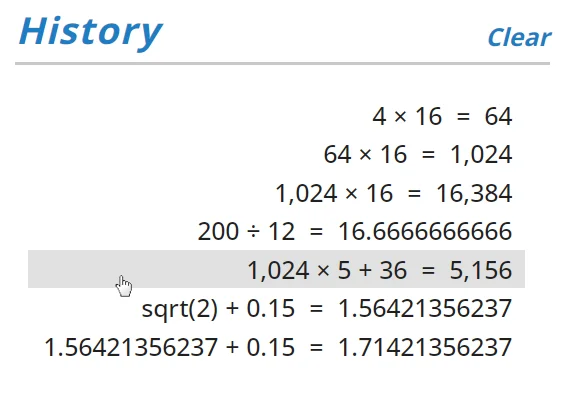
Every calculation you complete is added to your history: the full expression and its result. The history list holds the last hundred, so the work you did a few minutes ago is still right there. You don't have to do anything to save it, it just happens as you go. You can turn off this feature on calculator Settings panel
Click Line To Pick Up Where You Left Off
Open the history panel from the menu and you'll see your calculations in a scrollable list. Click any one of them and you're back at the calculator with that result on the display, ready to use. Whatever you type next continues from that number, so no copying, no re-entering, no losing your place.


Changes How You Work
History turns the calculator into something you can check your own work with. Glance back to confirm a figure you entered earlier. Pull an intermediate result forward instead of recalculating it. Reuse a subtotal three steps later without writing it down. For anyone working through more than one number at a time, it's the difference between a tool that helps and one that just answers.
Still There When You Return
Your history doesn't disappear when you close the tab. With the Save Work setting ON (the default) everything is saved in your browser as it happens. So you can leave and return to where you were. Close the window in the middle of a calculation, reopen it later, and you can finish the very calculation you started: the display, your history, your memory, and your settings all come back just as you left them. If you'd prefer not to save, switching the Save Work setting to OFF keeps each session self-contained. If you just want to clear your calculation history, you can do this on the history panel.
Related . . .
How Equals Key WorksExample Calculations Calculator Tips & Tricks

